Showing posts with label ANDROID NEWS. Show all posts

New Samsung Galaxy Note 8 Leak Hints At More Secrets: What Are Those Cutouts For?-VAN_NEWS


A new leak for the Samsung Galaxy Note 8 shows that Samsung might still be holding some secrets for the highly anticipated smartphone. An updated screen protector for the device features cutouts with currently unknown purposes. (Photo : OnLeaks | Twitter)

Samsung Galaxy Note 8 rumors are everywhere, already revealing most of the details that customers can expect from the upcoming smartphone. However, a new leak shows that Samsung might still be holding some secrets for the Galaxy Note 8.
Samsung may have already revealed the design of the Galaxy Note 8 ahead of schedule through a tweet promoting the Exynos 8895, but the new leak takes a closer look at the smartphone's front panel

Samsung Galaxy Note 8 Screen Protector Features Six Cutouts

OnLeaks, a reliable source of leaked information, tweeted a photo that contained three variations of a Galaxy Note 8 tempered glass screen protector. OnLeaks claimed that Chinese manufacturers have started updating their products as the Galaxy Note 8 release draws nearer.
The obvious difference between the three Galaxy Note 8 screen protectors is the cutouts that are housed at the top bezel.
The first screen protector, dated June 16, contains four cutouts, while a CAD drawing by OnLeaks from June 27 featured six cutouts. The third screen protector, which also has six cutouts but at different sizes compared to OnLeaks' CAD drawing, is the newly leaked one.

Google Duo Android App Surpasses 100 Million Downloads-VAN_NEWS


The Google Duo Android app surpassed 100 million downloads, as evidenced by its listing on the Google Play Store. The mobile video calling service had a rather promising start last summer, having amassed five million installs in just one week following its debut in mid-August but didn’t manage to maintain that traction due to a variety of reasons. Google’s Android tool is now seemingly on the upswing again, having reached 50 million downloads only two months ago and now doubling that figure exactly one month before its first anniversary.
The Alphabet-owned company initially introduced Google Duo as a relatively simple video calling app with an intuitive user interface. Its streamlined design philosophy allowed the service to be even more accessible than many of its competitors, though its limited capabilities may have hindered its growth in the beginning. Google eventually tweaked its product strategy and decided to allow users to make audio-only calls using Google Duo, with that particular functionality rolling out worldwide in mid-April. One month later, the service started gaining traction again and its volume of Android downloads doubled in the last few months. The sole number of installs given by the Google Play Store isn’t equal to the number of active users, though recent trends still suggest that millions of people are using Google Duo on a fairly regular basis. It’s currently unclear whether the aforementioned addition of audio-only calls is the main reason for its recent popularity surge, though it likely didn’t hurt, with many previous Google Play Store reviews complaining about the app’s one-dimensional nature.
In light of recent developments, it’s possible that the tech giant continues introducing new major features to Google Duo in hopes of capturing an even wider audience and maintaining its recently gained traction. Being a Google-made app, the service is expected to be fully compatible with the upcoming stable release of Android O that’s expected to hit the Pixel, Pixel XL, and compatible Nexus devices by the end of summer. More details on the upcoming additions to Google Duo and general software-related efforts of Alphabet’s subsidiary should follow in the coming weeks, if not sooner.
New image of Pixel XL 2 shows up along with info on features-VAN_NEWS

New image of Pixel XL 2 shows up along with info on features-VAN_NEWS

Earlier today several images showed up that supposedly reveal the design of the forthcoming LG V30 smartphone. Turns out that was not the only LG manufactured device to be the subject of the rumor mill. A new image also surfaced that claims to be the next Google Pixel XL device. Along with the image and what can be gleaned from it regarding the new Pixel XL, sources also indicate the device will get a “squeezable” frame similar to what the HTC U11 offers.
As far as the design, the back of the device appears consist with other renders we have seen that show the glass portion of the back much smaller relative to the overall device. One of the byproducts of that area shrinking is that the fingerprint sensor moves into the metal portion of the case. Sources also note that it is unclear as to whether the camera lens will once again be flush with the body of the phone and just based on this image, that could go either way. Also of note is that antenna bands appear to be missing, so we will have to wait to see if that is just something missing in these early renders or if Google and LG figured out a way to make them essentially invisible from a design standpoint.

On the front side of the device, the new second-generation Pixel XL is slated to get an LG produced AMOLED screen that is approximately 6-inches in size and will have a 2:1 aspect ratio. Maybe more importantly from a sales standpoint, it appears LG will be using the same super-slim bezel design and rounded corners found on the LG G6. This will be good for Google in their efforts to keep pace with the flagship market.
One area that may differ from the front screen trends we are seeing is that it looks like LG was willing to put a speaker grille along the top of the front of the phone next to the front-facing camera. We will have to see if this is matched up with a similar bottom of the screen speaker to create a strong stereo effect and a potential unique selling point for the device.
Along with the information above that sources have tried to figure out from the image, it is also believed that the new Pixel XL device, whatever it is ultimately named, will have a “squeezable” frame. This will primarily be used to access and use the Google Assistant, although other uses may be possible as well.
Unfortunately, sources did not have any information on the next generation Pixeldevice. We are still waiting to see whether that device will match the larger Pixel XL in terms of hardware with just a smaller screen or if it will actually be a slightly less powerful device.

          What do you think of this possible design for the 2017 version of the Pixel XL?

Xperia XZ Premium: Will you buy it for Rs 62k?-VAN_NEWS

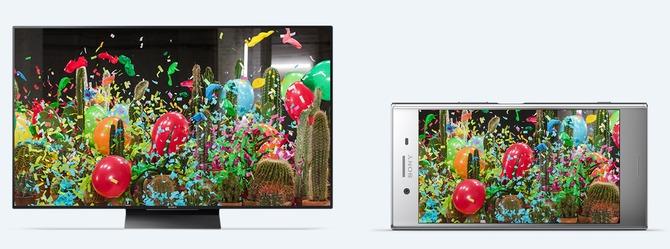
A phone with a 4K display akin to Sony Bravia TV screens, discovers Kakoli Chakraborty.


The Sony Xperia XZ Premium competes with the likes of OnePlus 5 in terms of specs.
Its 5.5-inch screen with plastic sides makes it look less like a flagship, but the phone is considerably lightweight and great for one-handed use.
It has Gorilla Glass 5 coating on both sides, but the back is prone to fingerprint smudges, although it is dust- and water-resistant.
Sony has ditched the rear fingerprint scanner for one on the side that doubles as power button, which provides for faster unlocking.
The phone boasts of 4K display akin to the Sony Bravia TV screens.
The colours are enhanced and watching American Gods was a visual treat.
The phone houses a Snapdragon 835 processor with a 4GB RAM.
Sony's emphasis on performance ensures the phone doesn't buckle with RAM-heavy games and apps.
The phone supports PS4 Remote Play that syncs with a PS4.
I finished a side mission in Tom Clancy's Ghost Recon: Wildlands without any lag.
It runs Android 7 Nougat and the operating system is a delight to use.
The phone's 3,230 mAh battery lasted me a full day on moderate usage, which included gaming and Netflix sessions.
But even better is the phone's camera.
The device comes with 19 MP primary and 13 MP secondary cameras.
The brilliant slow motion feature captures footage at 960fps -- a higher rate than in iPhone 7.
You can also add the slow motion effect after shooting the video.
In pictures, the colours are balanced. It performs great even in low light.
At Rs 61,990, the Sony Xperia XZ Premium is for people who are looking for pure performance, which is at par, if not better, than the best flagship in the market

WhatsApp's latest update will save you time while you text--VAN_NEWS


The popular messaging app is making a few things easier when it rolls out its latest update

whatsappmain

WhatsApp is going to make a few small changes to the way you text with its next update.
Although the Facebook-owned app lets you add bold, italic and strikethrough effects to your text, it can be tricky to remember how. You need to type in specific key patterns, such as *bold* for bold or _italic_ for italic , to put them in your message.

But WhatsApp looks set to make this a lot easier with a new drop-down menu that will let you select different font effects for the highlighted text.


The service is currently Beta testing WhatsApp 2.17.148 which will introduce this time-saving method. Currently it's only available on Android but will likely come to iPhones in the future as well.
There's been no official word from WhatsApp about when to expect the new update or whether there will be additional features added in. But it marks the latest in a series of updates that has also included the option to send more files across the service .
Whether it's a PDF, Word document, spreadsheet or an APK file, WhatsApp's 1.2 billion users will soon be able to send them across to each other or share them in a group.
And now they'll be able to send them accompanied by some big, bold text.

What is Instagram Stories and how does it work???-VAN_NEWS

What is Instagram Stories?

Instagram has described its new Stories feature as something that lets you "share all the moments of your day, not just the ones you want to keep on your profile". The feature basically enables you to share multiple photos and videos, and they appear together in a "slideshow format", which basically means a reel, like Snapchat. And, of course, these photos and videos will disappear after 24 hours. Seriously.
You can even add text and doodles to your photos and videos. See? We weren't kidding; it's exactly like Snapchat Stories.

How does Instagram Stories work?

Posting;

Tap the camera button in the top left of your screen or swipe right from anywhere in your Instagram Feed. Then, tap or long press the record button at the bottom to take a photo or video, respectively. You can also tap Boomerang to take burst photos that loop forward or backward, and you can swipe left to go hands-free. Either way, once done, tap the doodle, text, or sticker icons to add effects.

Once you're finished editing, you can save your creation to your phone or tap the + circle icon to share it to your story. Photos and videos you share to your story disappear from the feed and your profile after 24 hours. If you don't want someone to see your story, you can hide your story from them. Just tap the profile icon to access your profile, and then tap the settings/more button.
From there, select Story Settings below Account, then tap Hide Story From, and select the people you'd like to hide your story from. Simples.

Viewing

When you post a photo or video to your story, it appears on your profile (a colourful ring will appear around your profile picture, and people can tap it to see your story) and at the top of the Instagram feed (your profile picture will appear in a row at the top of your followers' feeds, and they can tap it to see your story). Stories shared publicly may also appear in the
Search & Explore tabs.
Additionally, if you've added a hashtag, location, or location-based sticker, it may also appear on
hashtag or location pages.

Replying

You can now reply to stories with a photo or video. In addition to writing a message reply, you can also respond with an image. When you're watching a story, there's a new camera button at the bottom of the screen. Tap that, and then snap a pic of yourself or record a video or take a Boomerang. You can move and resize the story image that you're replying to, as well, and insert that in your photo.
From there, apply filters or stickers, and when you're done, hit send to share your creation with your friend. Your friend will get your photo/video response in their Direct message inbox, along with the thumbnail of the original story.

What else can Instagram Stories do?
Add effects: Like Snapchat, you can add doodles, text, stickers, live face filters, and geostickers to your story.
See who's watching your story: When watching your own story, swipe up to see who’s watched each photo and video.
Make your story private: If your account is set to private, your story will only be visible to your followers. You can also hide your entire story from anyone you don’t want to see it, even if they follow you.
Post your story to your profile: Your Instagram Story by default won’t appear on your profile grid or in feed, but you can choose to feature a particular part of your story by posting it on your profile.

What does your phone's airplane mode actually do? This is why it's important to use it during a flight

What does your phone's airplane mode actually do? This is why it's important to use it during a flight

Most people think planes will fall out of the sky if their phones are switched on - while this isn't true, the real reason is still significant

By imma Nike

We're all told to switch our phones to airplane mode when we board a flight - or turn them off completely - but why?
You might have been told that the signal interferes with the vehicle's electronics, causing you to have horrible thoughts of the plane falling out of the sky.
While you might have realised this isn't true if you've accidentally left yours on, the real reason behind airplane mode is still important.
According to a pilot's blog on AirlineUpdates.net , mobile phones do interfere with electronics - just not in the way we think.


They actually cause interference on the aircraft's radios, which pilots can then hear in their headphones. It's the same noise you'll be familiar with if you put your mobile too close to a speaker.


The pilot wrote: "It is not safety critical, but is annoying for sure.
"If say 50 people on board are inconsiderate enough who can’t be bothered to switch their [mobile phone] off, there will be 50 phones constantly looking for cell towers at maximum power. That is a lot of radio pollution.
"It is common courtesy. By switching your phone to airplane mode you show your appreciation to the people doing their job to get you where you want to be."
Apparently it's fairly rare, as the pilot added: "I hear it maybe once or twice a month, and I fly about 50 flights every month."
Airplane mode stops this interference from occuring, meaning happy pilots in the cockpit.
So next time you're on a plane, consider who you might be annoying when you're told to switch your phone off - and definitely switch it into flight mode.
WhatsApp's support for BlackBerry platform extended yet again

WhatsApp's support for BlackBerry platform extended yet again

WhatsApp's support for BlackBerry platform extended yet again

Back in February last year, WhatsApp announced that it will stop supporting versions of BlackBerry OS - including BlackBerry 10 - by the end of 2016. That, however didn't happen, and the date was pushed back to June 30, 2017.
Now, the Facebook-owned service has confirmed that the support has been extended yet again - till 31 December 2017 this time.
In fact, WhatsApp's Blackberry client has started receiving a new update, with change-log clearly saying: changed client end-of-life date to December 31, 2017.
Aside from BlackBerry, support for the Nokia S40 has also been extended to end of this year. The app, however, will stop working on Nokia S60 devices after June 30 2017.

Beware! Over 800 Android Apps on Google Play Store Contain 'Xavier' Malware's

Beware! Over 800 Android Apps on Google Play Store Contain 'Xavier' Malware

Over 800 different Android apps that have been downloaded millions of times from Google Play Store found to be infected with malicious ad library that silently collects sensitive user data and can perform dangerous operations.

Dubbed "Xavier," the malicious ad library, initially emerged in September 2016, is a member of AdDown malware family, potentially posing a severe threat to millions of Android users.

Since 90 percent of Android apps are free for anyone to download, advertising on them is a key revenue source for their developers. For this, they integrate Android SDK Ads Library in their apps, which usually doesn't affect an app's core functionality.

According to security researchers at Trend Micro, the malicious ad library comes pre-installed on a wide range of Android applications, including photo editors, wallpapers and ringtone changers, Phone tracking, Volume Booster, Ram Optimizer and music-video player.

Features of Xavier Info-Stealing Malware


The previous variant of Xavier Ad library was a simple adware with an ability to install other APKs silently on the targeted devices, but in the latest release, the malware author has replaced those features with more sophisticated ones, including:
  • Evade Detection: Xavier is smart enough to escape from being analyzed, from both static and dynamic malware analysis, by checking if it is being running in a controlled environment (Emulator), and using data and communication encryptions.
  • Remote Code Execution: The malware has been designed to download codes from a remote Command & Control (C&C) server, allowing hackers to remotely execute any malicious code on the targeted device.
  • Info-Stealing Module: Xavier is configured to steal devices and user related information, which includes user’ email address, Device id, model, OS version, country, manufacturer, sim card operator, resolution, and Installed apps.
According to the researchers, the highest number of infected users are from Southeast countries in Asia such as Vietnam, Philippines, and Indonesia, with a fewer number of downloads are from the United States and Europe.

Here is a list of 75 infected Android apps that Google has already removed from its Play Store, and if you have installed any of these apps on your device, you are advised to remove it immediately.
Android malware continues to evolve with more sophisticated and never-seen-before capabilities with every passing day. Just last week, we saw first Android malware with code injecting capabilities making rounds on Google Play Store.

How to Protect Yourself


The easiest way to prevent yourself from being targeted by a clever malware like Xavier, always beware of fishy applications, even when downloading them from official Play Store and try to stick to the trusted brands only.

Moreover, always look at the reviews below left by other users who have downloaded the app and verify app permissions before installing any app and grant those permissions that have are relevant for the app's purpose.

Last but not the least, you are strongly advised to always keep a good antivirus application on your device that can detect and block such malware before they can infect your device, and keep your device and apps up-to-date.